Send customer emails froma domain your business owns.
Connect and verify your sending domain so your outbound communication feels more professional, consistent, and aligned with your brand.

Why it matters
Keep your outbound communication aligned with your brand.
A verified sending domain helps your messages come from an address your customers recognize and keeps your communication consistent across Harp.
- Customers see an address that matches your business
- One consistent sender across your email campaigns
- You decide which addresses can send from Harp

Generic sender
no-reply@mail-provider.example
Something just for you, Ada
Thanks for shopping with us. Enjoy 20% off…
Your verified domain
Acme Studiohello@acme.co
Something just for you, Ada
Thanks for shopping with us. Enjoy 20% off…
Setup
Connect your domain in a few clear steps.
- 01
Add domain
Enter the domain you want to use.
- 02
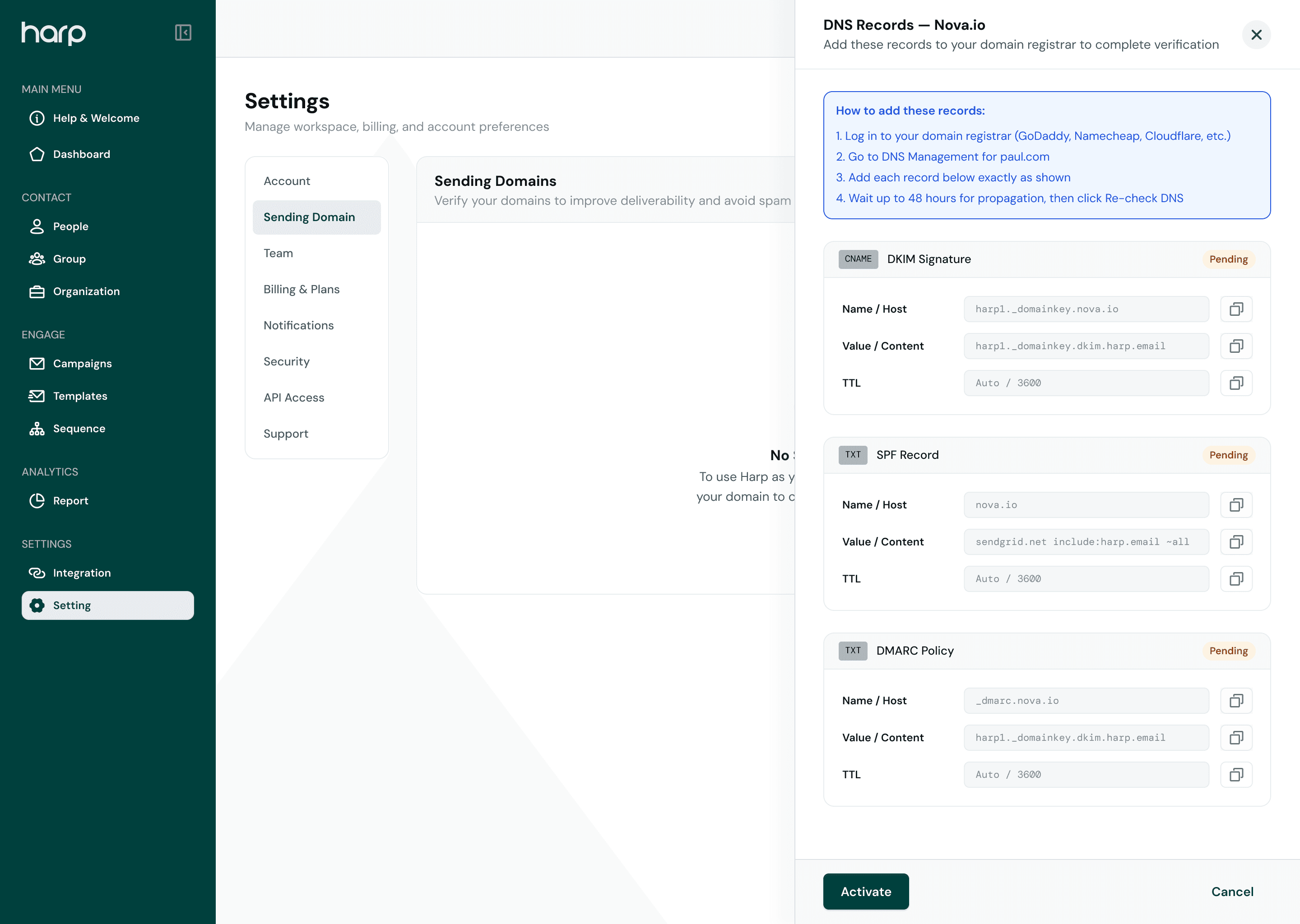
Add DNS records
Copy the required records into your domain provider.
- 03
Verify
Harp checks that the records are configured correctly.
- 04
Start sending
Use the verified domain for your email campaigns.
DNS records
Everything you need to configure your domain.
Harp lists each record your domain provider needs, and shows which ones are already in place.
mail.acme.co
Add these records at your domain provider
- TXT
- Host
- @
- Value
v=spf1 include:<provided-by-harp> ~all- Status
- Verified
- CNAME
- Host
- harp._domainkey
- Value
<provided-by-harp>.dkim- Status
- Verified
- CNAME
- Host
- bounce
- Value
<provided-by-harp>- Status
- Pending
- TXT
- Host
- _dmarc
- Value
v=DMARC1; p=none;- Status
- Needs attention
Example records. Values in <angle brackets> are generated by Harp for your domain.
Verification status
Know exactly when your domain is ready.
- Not configured
Not configured
The domain is added, but no records have been found yet.
- Pending
Verification pending
Records are in place and Harp is checking them.
- Verified
Verified
Everything checks out. The domain is ready to send from.
- Action required
Action required
A record is missing or incorrect and needs updating.
Connected workflow
Use your verified domain across Harp communication.
Once a domain is verified, it becomes a sender identity you can use for your email campaigns.
- 01
Sending domain
Your business domain, verified in Harp.
acme.co - 02
Sender identity
The address your emails come from.
hello@acme.coActive - 03
Email campaigns
Campaigns sent from that address.
September Offer - 04
Customer
Sees a sender they recognize.
Acme Studio · hello@acme.co
Send with a domainyour customers recognize.
Connect your business domain and keep your Harp communication consistent with your brand.